Keywords
UIST2.0 Archive - 20 years of UIST
Back
Back to keywords index

navigation

3d navigation

In Proceedings of UIST 2002
Article Picture

StyleCam: interactive stylized 3D navigation using integrated spatial & temporal controls (p. 101-110)

Abstract plus

This paper describes StyleCam, an approach for authoring 3D viewing experiences that incorporate stylistic elements that are not available in typical 3D viewers. A key aspect of StyleCam is that it allows the author to significantly tailor what the user sees and when they see it. The resulting viewing experience can approach the visual richness and pacing of highly authored visual content such as television commercials or feature films. At the same time, StyleCam allows for a satisfying level of interactivity while avoiding the problems inherent in using unconstrained camera models. The main components of StyleCam are camera surfaces which spatially constrain the viewing camera; animation clips that allow for visually appealing transitions between different camera surfaces; and a simple, unified, interaction technique that permits the user to seamlessly and continuously move between spatial-control of the camera and temporal-control of the animated transitions. Further, the user's focus of attention is always kept on the content, and not on extraneous interface widgets. In addition to describing the conceptual model of StyleCam, its current implementation, and an example authored experience, we also present the results of an evaluation involving real users.

In Proceedings of UIST 2002
Article Picture

Boom chameleon: simultaneous capture of 3D viewpoint, voice and gesture annotations on a spatially-aware display (p. 111-120)

Abstract plus

We introduce the Boom Chameleon, a novel input/output device consisting of a flat-panel display mounted on a tracked mechanical boom. The display acts as a physical window into 3D virtual environments, through which a one-to-one mapping between real and virtual space is preserved. The Boom Chameleon is further augmented with a touch-screen and a microphone/speaker combination. We present a 3D annotation application that exploits this unique configuration in order to simultaneously capture viewpoint, voice and gesture information. Design issues are discussed and results of an informal user study on the device and annotation software are presented. The results show that the Boom Chameleon annotation facilities have the potential to be an effective, easy to learn and operate 3D design review system.

hypertext navigation

In Proceedings of UIST 1998
Article Picture

Scratchpad: mechanisms for better navigation in directed Web searching (p. 1-8)

information navigation

In Proceedings of UIST 1994
Article Picture

Pad++: a zooming graphical interface for exploring alternate interface physics (p. 17-26)

Abstract plus

We describe the current status of Pad++, a zooming graphical interface that we are exploring as an alternative to traditional window and icon-based approaches to interface design. We discuss the motivation for Pad++, describe the implementation, and present prototype applications. In addition, we introduce an informational physics strategy for interface design and briefly compare it with metaphor-based design strategies.

In Proceedings of UIST 1998
Article Picture

Scratchpad: mechanisms for better navigation in directed Web searching (p. 1-8)

In Proceedings of UIST 1998
Article Picture

Critical zones in desert fog: aids to multiscale navigation (p. 97-106)

map navigation

In Proceedings of UIST 1998
Article Picture

Interaction and modeling techniques for desktop two-handed input (p. 49-58)

multi-scale navigation

In Proceedings of UIST 2005
Article Picture

Zliding: fluid zooming and sliding for high precision parameter manipulation (p. 143-152)

Abstract plus

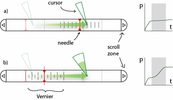
High precision parameter manipulation tasks typically require adjustment of the scale of manipulation in addition to the parameter itself. This paper introduces the notion of Zoom Sliding, or Zliding, for fluid integrated manipulation of scale (zooming) via pressure input while parameter manipulation within that scale is achieved via x-y cursor movement (sliding). We also present the Zlider (Figure 1), a widget that instantiates the Zliding concept. We experimentally evaluate three different input techniques for use with the Zlider in conjunction with a stylus for x-y cursor positioning, in a high accuracy zoom and select task. Our results marginally favor the stylus with integrated isometric pressure sensing tip over bimanual techniques which separate zooming and sliding controls over the two hands. We discuss the implications of our results and present further designs that make use of Zliding.

navigation

In Proceedings of UIST 1993
Article Picture

A toolset for navigation in virtual environments (p. 157-165)

In Proceedings of UIST 1995
Article Picture

The continuous zoom: a constrained fisheye technique for viewing and navigating large information spaces (p. 207-215)

In Proceedings of UIST 1996
Article Picture

Adding imageability features to information displays (p. 33-39)

In Proceedings of UIST 1998
Article Picture

Critical zones in desert fog: aids to multiscale navigation (p. 97-106)

In Proceedings of UIST 2000
Article Picture

Speed-dependent automatic zooming for browsing large documents (p. 139-148)

In Proceedings of UIST 2006
Article Picture

Content-aware scrolling (p. 155-158)

Abstract plus

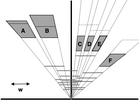
Scrolling is used to navigate large information spaces on small screens, but is often too restrictive or cumbersome to use for particular types of content, such as multi-page, multi-column documents. To address this problem, we introduce content-aware scrolling (CAS), an approach that takes into account various characteristics of document content to determine scrolling direction, speed, and zoom. We also present the CAS widget, which supports scrolling through a content-aware path using traditional scrolling methods, demonstrating the advantages of making a traditional technique content-aware.

In Proceedings of UIST 2006
Article Picture

Personalizing routes (p. 187-190)

Abstract plus

Navigation services (e.g., in-car navigation systems and online mapping sites) compute routes between two locations to help users navigate. However, these routes may direct users along an unfamiliar path when a familiar path exists, or, conversely, may include redundant information that the user already knows. These overly complicated directions increase the cognitive load of the user, which may lead to a dangerous driving environment. Since the level of detail is user specific and depends on their familiarity with a region, routes need to be personalized. We have developed a system, called MyRoute, that reduces route complexity by creating user specific routes based on a priori knowledge of familiar routes and landmarks. MyRoute works by compressing well known steps into a single contextualized step and rerouting users along familiar routes.

In Proceedings of UIST 2006
Article Picture

Robust computer vision-based detection of pinching for one and two-handed gesture input (p. 255-258)

Abstract plus

We present a computer vision technique to detect when the user brings their thumb and forefinger together (a pinch gesture) for close-range and relatively controlled viewing circumstances. The technique avoids complex and fragile hand tracking algorithms by detecting the hole formed when the thumb and forefinger are touching; this hole is found by simple analysis of the connected components of the background segmented against the hand. Our Thumb and Fore-Finger Interface (TAFFI) demonstrates the technique for cursor control as well as map navigation using one and two-handed interactions.

navigation technique

In Proceedings of UIST 1995
Article Picture

Using information murals in visualization applications (p. 73-74)

web navigation