
It is generally accepted that it is important to involve the end users of a Graphical User Interface (GUI) in all stages of its design and development. However, traditional GUI development tools typically do not support collaborative design. TelePICTIVE is an experimental software prototype designed to allow computer-naive users to collaborate with experts at possibly remote locations in designing GUIs.
TelePICTIVE is based on the PICTIVE participatory design methodology, and has been prototyped using the RENDEZVOUS system. In this paper we describe TelePICTIVE, and show how it is designed to support collaboration among a group of GUI designers with diverse levels of expertise. We also explore some of the issue that have come up during development and initial usability testing, such as how to coordinate simultaneous access to a shared design surface, and how to engage in the participatory design of GUIs using a Computer-Supported Cooperative Work (CSCW) system.

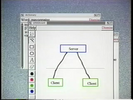
This paper describes Visual Obliq, a user interface development environment for constructing distributed, multi-user applications. Applications are created by designing the interface with a GUI-builder and embedding callback code in an interpreted language, in much the same way as one would build a traditional (non-distributed, single-user) application with a modern user interface development environment. The resulting application can be run from within the GUI-builder for rapid turnaround or as a stand-alone executable. The Visual Obliq runtime provides abstractions and support for issues specific to distributed computing, such as replication, sharing, communication, and session management. We believe that the abstractions provided, the simplicity of the programming model, the rapid turnaround time, and the applicability to heterogeneous environments, make Visual Obliq a viable tool for authoring distributed applications and groupware.

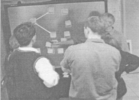
In our previous studies into web design, we found that pens, paper, walls, and tables were often used for explaining, developing, and communicating ideas during the early phases of design. These wall-scale paper-based design practices inspired The Designers' Outpost, a tangible user interface that combines the affordances of paper and large physical workspaces with the advantages of electronic media to support information design. With Outpost, users collaboratively author web site information architectures on an electronic whiteboard using physical media (Post-it notes and images), structuring and annotating that information with electronic pens. This interaction is enabled by a touch-sensitive SMART Board augmented with a robust computer vision system, employing a rear-mounted video camera for capturing movement and a front-mounted high-resolution camera for capturing ink. We conducted a participatory design study with fifteen professional web designers. The study validated that Outpost supports information architecture work practice, and led to our adding support for fluid transitions to other tools.

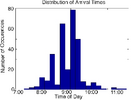
People use their awareness of others' temporal patterns to plan work activities and communication. This paper presents algorithms for programatically detecting and modeling temporal patterns from a record of online presence data. We describe analytic and end-user visualizations of rhythmic patterns and the tradeoffs between them. We conducted a design study that explored the accuracy of the derived rhythm models compared to user perceptions, user preference among the visualization alternatives, and users' privacy preferences. We also present a prototype application based on the rhythm model that detects when a person is "away" for an extended period and predicts their return. We discuss the implications of this technology on the design of computer-mediated communication.

Classroom BRIDGE supports activity awareness by facilitating planning and goal revision in collaborative, project-based middle school science. It integrates large-screen and desktop views of project times to support incidental creation of awareness information through routine document transactions, integrated presentation of awareness information as part of workspace views, and public access to subgroup activity. It demonstrates and develops an object replication approach to integrating synchronous and asynchronous distributed work for a platform incorporating both desktop and large-screen devices. This paper describes an implementation of these concepts with preliminary evaluation data, using timeline-based user interfaces.

Collaboration often relies on all group members having a shared view of a single-user application. A common situation is a single active presenter sharing a live view of her workstation screen with a passive audience, using simple hardware-based video signal projection onto a large screen or simple bitmap-based sharing protocols. This offers simplicity and some advantages over more sophisticated software-based replication solutions, but everyone has the exact same view of the application. This conflicts with the presenter's need to keep some information and interaction details private. It also fails to recognize the needs of the passive audience, who may struggle to follow the presentation because of verbosity, display clutter or insufficient familiarity with the application.Views that cater to the different roles of the presenter and the audience can be provided by custom solutions, but these tend to be bound to a particular application. In this paper we describe a general technique and implementation details of a prototype system that allows standardized role-specific views of existing single-user applications and permits additional customization that is application-specific with no change to the application source code. Role-based policies control manipulation and display of shared windows and image buffers produced by the application, providing semi-automated privacy protection and relaxed verbosity to meet both presenter and audience needs.

In this paper, we discuss our adaptation of a single-display, single-user commercial application for use in a multi-device, multi-user environment. We wrap Google Earth, a popular geospatial application, in a manner that allows for synchronized coordinated views among multiple instances running on different machines in the same co-located environment. The environment includes a touch-sensitive tabletop display, three vertical wall displays, and a TabletPC. A set of interaction techniques that allow a group to manage and exploit this collection of devices is presented.

Help-seeking communities have been playing an increasingly critical role in the way people seek and share information. However, traditional help-seeking mechanisms of these online communities have some limitations. In this paper, we describe an expertise-finding mechanism that attempts to alleviate the limitations caused by not knowing users' expertise levels. As a result of using social network data from the online community, this mechanism can automatically infer expertise level. This allows, for example, a question list to be personalized to the user's expertise level as well as to keyword similarity. We believe this expertise location mechanism will facilitate the development of next generation help-seeking communities.