We describe a set of application frameworks designed especially to support information-intensive applications in complex domains, where the visual organization of an application's information is critical. Our frameworks, called visual formalisms, provide the semantic structures and editing operations, as well as the visual layout algorithms, needed to create a complete application. Examples of visual formalisms include tables, panels, graphs, and outlines. They are designed to be extended both by programmers, through subclassing, and by end users, through an integrated extension language.

Many tasks require users to extract information from diverse sources, to edit or process this information locally, and to explore how the end results are affected by changes in the information or in its processing. We present the RecipeSheet, a general-purpose tool for assisting users in such tasks. The RecipeSheet lets users create information processors, called recipes, which may take input in a variety of forms such as text, Web pages, or XML, and produce results in a similar variety of forms. The processing carried out by a recipe may be specified using a macro or query language, of which we currently support Rexx, Smalltalk and XQuery, or by capturing the behaviour of a Web application or Web service. In the RecipeSheet's spreadsheet-inspired user interface, information appears in cells, with inter-cell dependencies defined by recipes rather than formulas. Users can also intervene manually to control which information flows through the dependency connections. Through a series of examples we illustrate how tasks that would be challenging in existing environments are supported by the RecipeSheet.

Many applications provide a form-like interface for requesting information: the user fills in some fields, submits the form, and the application presents corresponding results. Such a procedure becomes burdensome if (1) the user must submit many different requests, for example in pursuing a trial-and-error search, (2) results from one application are to be used as inputs for another, requiring the user to transfer them by hand, or (3) the user wants to compare results, but only the results from one request can be seen at a time. We describe how users can reduce this burden by creating custom interfaces using three mechanisms: clipping of input and result elements from existing applications to form cells on a spreadsheet; connecting these cells using formulas, thus enabling result transfer between applications; and cloning cells so that multiple requests can be handled side by side. We demonstrate a prototype of these mechanisms, initially specialised for handling Web applications, and show how it lets users build new interfaces to suit their individual needs.

System administrators work with many different tools to manage and fix complex hardware and software infrastructure in a rapidly paced work environment. Through extensive field studies, we observed that they often build and share custom tools for specific tasks that are not supported by vendor tools. Recent trends toward web-based management consoles offer many advantages but put an extra burden on system administrators, as customization requires web programming, which is beyond the skills of many system administrators. To meet their needs, we developed A1, a spreadsheet-based environment with a task-specific system-administration language for quickly creating small tools or migrating existing scripts to run as web portlets. Using A1, system administrators can build spreadsheets to access remote and heterogeneous systems, gather and integrate status data, and orchestrate control of disparate systems in a uniform way. A preliminary user study showed that in just a few hours, system administrators can learn to use A1 to build relatively complex tools from scratch.

Modern applications provide interfaces for scripting, but many users do not know how to write script commands. However, many users are familiar with the idea of entering keywords into a web search engine. Hence, if a user is familiar with the vocabulary of an application domain, we anticipate that they could write a set of keywords expressing a command in that domain. For instance, in the web browsing domain, a user might enter <B>click search button</B>. We call expressions of this form keyword commands, and we present a novel approach for translating keyword commands directly into executable code. Our prototype of this system in the web browsing domain translates <B>click search button</B> into the Chickenfoot code <B>click(findButton("search"))</B>. This code is then executed in the context of a web browser to carry out the effect. We also present an implementation of this system in the domain of Microsoft Word. A user study revealed that subjects could use keyword commands to successfully complete 90% of the web browsing tasks in our study without instructions or training. Conversely, we would expect users to complete close to 0% of the tasks if they had to guess the underlying JavaScript commands with no instructions or training.

We propose a new evolutionary method of extracting user preferences from examples shown to an automatic graph layout system. Using stochastic methods such as simulated annealing and genetic algorithms, automatic layout systems can find a good layout using an evaluation function which can calculate how good a given layout is. However, the evaluation function is usually not known beforehand, and it might vary from user to user. In our system, users show the system several pairs of good and bad layout examples, and the system infers the evaluation function from the examples using genetic programming technique. After the evaluation function evolves to reflect the preferences of the user, it is used as a general evaluation function for laying out graphs. The same technique can be used for a wide range of adaptive user interface systems.

User interface toolkits and higher-level tools built on top of them play an ever increasing part in developing graphical user interfaces. This paper describes the XIT system, a user interface development tool for the X Window System, based on Common Lisp, comprising user interface toolkits as well as high-level interactive tools organized into a layered architecture. We especially focus on the object-oriented design of the lower-level toolkits and show how advanced features for describing automatic screen layout, visual feedback, application links, complex interaction, and dialog control, usually not included in traditional user interface toolkits, are integrated.

This paper presents a demonstrational interface builder with improved reasoning capabilities. The system is comprised of two major components: an interactive display manager and a rule-based reasoner. The display manager provides facilities to draw the physical appearance of an interface and define interface behavior by graphical demonstration. The behavior is defined using a technique of stimulus-response demonstrations. With this technique, an interface developer first demonstrates a stimulus that represents an action that an end user will perform on the interface. After the stimulus, the developer demonstrates the response(s) that should result from the given stimulus. As the behavior is demonstrated, the reasoner observes the demonstrations and draws inferences to expedite behavior definition. The inferences entail generalizing from specific behavior demonstrations and identifying constraints that define the generalized behavior. Once behavior constraints are identified, the reasoner sends them to the display manager to complete the definition process. When the interface is executed by an end-user, the display manager uses the constraints to implement the run-time behavior of the interface.

We present an inference engine that can be used for creating Programming By Demonstration systems. The class of systems addressed are those which infer a state change description from examples of state [9, 11].
The engine can easily be incorporated into an existing design environment that provides an interactive object editor.
The main design goals of the inference engine are responsiveness and generality. All demonstrational systems must respond quickly because of their interactive use. They should also be general---they should be able to make inferences for any attribute that the user may want to define by demonstration, and they should be able to treat any other attributes as parameters of this definition.
The first goal, responsiveness, is best accommodated by limiting the number of attributes that the inference engine takes into consideration. This, however, is in obvious conflict with the second goal, generality.
This conflict is intrinsic to the class of demonstrational system described above. The challenge is to find an algorithm which responds quickly but does not heuristically limit the number of attributes it looks at. We present such an algorithm in this paper.
A companion paper describes Inference Bear [4], an actual demonstrational system that we have built using this inference engine and an existing user interface builder [5].

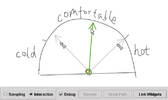
Informal prototyping tools have shown great potential in facilitating the early stage design of user interfaces. How-ever, continuous interactions, an important constituent of highly interactive interfaces, have not been well supported by previous tools. These interactions give continuous visual feedback, such as geometric changes of a graphical object, in response to continuous user input, such as the movement of a mouse. We built Monet, a sketch-based tool for proto-typing continuous interactions by demonstration. In Monet, designers can prototype continuous widgets and their states of interest using examples. They can also demonstrate com-pound behaviors involving multiple widgets by direct ma-nipulation. Monet allows continuous interactions to be eas-ily integrated with event-based, discrete interactions. Con-tinuous widgets can be embedded into storyboards and their states can condition or trigger storyboard transitions. Monet achieves these features by employing continuous function approximation and statistical classification techniques, without using any domain specific knowledge or assuming any application semantics. Informal feedback showed that Monet is a promising approach to enabling more complete tool support for early stage UI design.

An action inferring facility for a multimodal interface called Edward is described. Based on the actions the user performs, Edward anticipates future actions and offers to perform them automatically. The system uses inductive inference to anticipate actions. It generalizes over arguments and results, and detects patterns on the basis of a small sequence of user actions, e.g. “copy a lisp file; change extension of original file into .org; put the copy in the backup folder”. Multimodality (particularly the combination of natural language and simulated pointing gestures) and the reuse of patterns are important new features. Some possibilities and problems of action inferring interfaces in general are addressed. Action inferring interfaces are particularly useful for professional users of general-purpose applications. Such users are unable to program repetitive patterns because either the applications do not provide the facilities or the users lack the capabilities.

Many tasks performed using computer interfaces are very repetitive. While programmers can write macros or procedures to automate these repetitive tasks, this requires special skills. Demonstrational systems make macro building accessible to all users, but most provide either no visual representation of the macro or only a textual representation. We have developed a history-based visual representation of commands in a graphical user interface. This representation supports the definition of macros by example in several novel ways. At any time, a user can open a history window, review the commands executed in a session, select operations to encapsulate into a macro, and choose objects and their attributes as arguments. The system has facilities to generalize the macro automatically, save it for future use, and edit it.

Graphical user interfaces (GUI) provide intuitive and easy means for users to communicate with computers. However, construction of GUI software requires complex programming that is far from being intuitive. Because of the “semantic gap” between the textual application program and its graphical interface, the programmer himself must conceptually maintain the correspondence between the textual programming and the graphical image of the resulting interface. Instead, we propose a programming environment based on the programming by visual example (PBVE) scheme, which allows the GUI designers to “program” visual interfaces for their applications by “drawing” the example visualization of application data with a direct manipulation interface. Our system, TRIP3, realizes this with (1) the bi-directional translation model between the (abstract) application data and the pictorial data of the GUI, and (2) the ability to generate mapping rules for the translation from example application data and its corresponding example visualization. The latter is made possible by the use of generalization of visual examples, where the system is able to automatically generate generalized mapping rules from a given set of examples.

The construction of application-specific Graphical User Interfaces (GUI) still needs considerable programming partly because the mapping between application data and its visual representation is complicated. This study proposes a system which generates GUIs by generalizing multiple sets of application data and its visualization examples. The most notable characteristic of the system is that programmers can interactively modify the mapping by “correcting” the system-generated visualization examples that represent the system's current notion of programmer's intentions. Conflicting mappings are automatically resolved via the use of constraint hierarchies.

We propose a new evolutionary method of extracting user preferences from examples shown to an automatic graph layout system. Using stochastic methods such as simulated annealing and genetic algorithms, automatic layout systems can find a good layout using an evaluation function which can calculate how good a given layout is. However, the evaluation function is usually not known beforehand, and it might vary from user to user. In our system, users show the system several pairs of good and bad layout examples, and the system infers the evaluation function from the examples using genetic programming technique. After the evaluation function evolves to reflect the preferences of the user, it is used as a general evaluation function for laying out graphs. The same technique can be used for a wide range of adaptive user interface systems.

Source-code examples of APIs enable developers to quickly gain a gestalt understanding of a library's functionality, and they support organically creating applications by incrementally modifying a functional starting point. As an increasing number of web sites provide APIs, significantlatent value lies in connecting the complementary representations between site and service - in essence, enabling sites themselves to be the example corpus. We introduce d.mix, a tool for creating web mashups that leverages this site-to-service correspondence. With d.mix, users browse annotated web sites and select elements to sample. d.mix's sampling mechanism generates the underlying service calls that yield those elements. This code can be edited, executed, and shared in d.mix's wiki-based hosting environment. This sampling approach leverages pre-existing web sites as example sets and supports fluid composition and modification of examples. An initial study with eight participants found d.mix to enable rapid experimentation, and suggested avenues for improving its annotation mechanism.
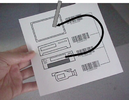
We introduce an inexpensive position input device called the FieldMouse, with which a computer can tell the position of the device on paper or any flat surface without using special input tablets or position detection devices. A FieldMouse is a combination of an ID recognizer like a barcode reader and a mouse which detects relative movement of the device. Using a FieldMouse, a user first detects an ID on paper by using the barcode reader, and then drags it from the ID using the mouse. If the location of the ID is known, the location of the dragged FieldMouse can also be calculated by adding the amount of movement from the ID to the position of the FieldMouse. Using a FieldMouse in this way, any flat surface can work as a pointing device that supports absolute position input, just by putting an ID tag somewhere on the surface. A FieldMouse can also be used for enabling a graphical user interface (GUI) on paper or on any flat surface by analyzing the direction and the amount of mouse movement after detecting an ID. In this paper, we introduce how a FieldMouse can be used in various situations to enable computing in real-world environments.

The new media types used in advance user interfaces and interactive systems introduce time as a significant variable. This paper addresses the architectural support and programming tools that should be provided to the programmer to manage the time dependencies. The approach considers that the basic models and programming paradigms adopted in the manipulation and management of time should be isomorphic with the spatial models used in existing graphical user interfaces.
The paper describes the architectural principles of a toolkit designed to support the construction of user interfaces with temporal characteristics. The Ttoolkit is an extension of an existing graphical user interface toolkit, the Xt toolkit. Its design is presented and a sample application is described.

A large proportion of computer-supported tasks---such as design exploration, decision analysis, data presentation, and many kinds of retrieval---can be characterised as user-driven processing of a body of data in search of an outcome that satisfies the user. Clearly such tasks can never be automated fully, but few existing tools offer support for mechanising more than the simplest repetitive aspects of the search. Reconnaissance facilities, in which the computer produces summary reports from exploration in directions suggested by the user, can save the user time and effort by revealing which areas are the most deserving of detailed investigation. The time users are prepared to spend on searching will be more effectively used, improving the likelihood of finding solutions that really meet their needs rather than merely being the first to appear satisfactory. This note describes an implemented example of reconnaissance, based on the parallel coordinates presentation technique.

This paper presents the architecture for an extensible toolkit used in construction and rapid prototyping of three dimensional interfaces, interactive illustrations, and three dimensional widgets. The toolkit provides methods for the direct manipulation of 3D primitives which can be linked together through a visual programming language to create complex constrained behavior. Features of the toolkit include the ability to visually build, encapsulate, and parameterize complex models, and impose limits on the models. The toolkit's constraint resolution technique is based on a dynamic object model similar to those in prototype delegation object systems. The toolkit has been used to rapidly prototype tools for mechanical modelling, scientific visualization, construct 3D widgets, and build mathematical illustrations.