
The home deployment of sensor-based systems offers many opportunities, particularly in the area of using sensor-based systems to support aging in place by monitoring an elder's activities of daily living. But existing approaches to home activity recognition are typically expensive, difficult to install, or intrude into the living space. This paper considers the feasibility of a new approach that "reaches into the home" via the existing infrastructure. Specifically, we deploy a small number of low-cost sensors at critical locations in a home's water distribution infrastructure. Based on water usage patterns, we can then infer activities in the home. To examine the feasibility of this approach, we deployed real sensors into a real home for six weeks. Among other findings, we show that a model built on microphone-based sensors that are placed away from systematic noise sources can identify 100% of clothes washer usage, 95% of dishwasher usage, 94% of showers, 88% of toilet flushes, 73% of bathroom sink activity lasting ten seconds or longer, and 81% of kitchen sink activity lasting ten seconds or longer. While there are clear limits to what activities can be detected when analyzing water usage, our new approach represents a sweet spot in the tradeoff between what information is collected at what cost.

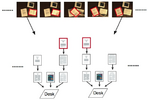
This paper presents an approach for tracking paper documents on the desk over time and automatically linking them to the corresponding electronic documents using an overhead video camera. We demonstrate our system in the context of two scenarios, paper tracking and photo sorting. In the paper tracking scenario, the system tracks changes in the stacks of printed documents and books on the desk and builds a complete representation of the spatial structure of the desktop. When users want to find a printed document buried in the stacks, they can query the system based on appearance, keywords, or access time. The system also provides a remote desktop interface for directly browsing the physical desktop from a remote location. In the photo sorting scenario, users sort printed photographs into physical stacks on the desk. The systemautomatically recognizes the photographs and organizes the corresponding digital photographs into separate folders according to the physical arrangement. Our framework provides a way to unify the physical and electronic desktops without the need for a specialized physical infrastructure except for a video camera.

EdgeWrite is a new unistroke text entry method for handheld devices designed to provide high accuracy and stability of motion for people with motor impairments. It is also effective for able-bodied people. An EdgeWrite user enters text by traversing the edges and diagonals of a square hole imposed over the usual text input area. Gesture recognition is accomplished not through pattern recognition but through the sequence of corners that are hit. This means that the full stroke path is unimportant and recognition is highly deterministic, enabling better accuracy than other gestural alphabets such as Graffiti. A study of able-bodied users showed subjects with no prior experience were 18% more accurate during text entry with Edge Write than with Graffiti (p>.05), with no significant difference in speed. A study of 4 subjects with motor impairments revealed that some of them were unable to do Graffiti, but all of them could do Edge Write. Those who could do both methods had dramatically better accuracy with Edge Write.

Zhai and Kristensson (2003) presented a method of speed-writing for pen-based computing which utilizes gesturing on a stylus keyboard for familiar words and tapping for others. In SHARK2:, we eliminated the necessity to alternate between the two modes of writing, allowing any word in a large vocabulary (e.g. 10,000-20,000 words) to be entered as a shorthand gesture. This new paradigm supports a gradual and seamless transition from visually guided tracing to recall-based gesturing. Based on the use characteristics and human performance observations, we designed and implemented the architecture, algorithms and interfaces of a high-capacity multi-channel pen-gesture recognition system. The system's key components and performance are also reported.

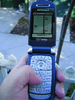
This paper presents TinyMotion, a pure software approach for detecting a mobile phone user's hand movement in real time by analyzing image sequences captured by the built-in camera. We present the design and implementation of TinyMotion and several interactive applications based on TinyMotion. Through both an informal evaluation and a formal 17-participant user study, we found that 1. TinyMotion can detect camera movement reliably under most background and illumination conditions. 2. Target acquisition tasks based on TinyMotion follow Fitts' law and Fitts law parameters can be used for TinyMotion based pointing performance measurement. 3. The users can use Vision TiltText, a TinyMotion enabled input method, to enter sentences faster than MultiTap with a few minutes of practicing. 4. Using camera phone as a handwriting capture device and performing large vocabulary, multilingual real time handwriting recognition on the cell phone are feasible. 5. TinyMotion based gaming is enjoyable and immediately available for the current generation camera phones. We also report user experiences and problems with TinyMotion based interaction as resources for future design and development of mobile interfaces.

Although mobile, tablet, large display, and tabletop computers increasingly present opportunities for using pen, finger, and wand gestures in user interfaces, implementing gesture recognition largely has been the privilege of pattern matching experts, not user interface prototypers. Although some user interface libraries and toolkits offer gesture recognizers, such infrastructure is often unavailable in design-oriented environments like Flash, scripting environments like JavaScript, or brand new off-desktop prototyping environments. To enable novice programmers to incorporate gestures into their UI prototypes, we present a "$1 recognizer" that is easy, cheap, and usable almost anywhere in about 100 lines of code. In a study comparing our $1 recognizer, Dynamic Time Warping, and the Rubine classifier on user-supplied gestures, we found that $1 obtains over 97% accuracy with only 1 loaded template and 99% accuracy with 3+ loaded templates. These results were nearly identical to DTW and superior to Rubine. In addition, we found that medium-speed gestures, in which users balanced speed and accuracy, were recognized better than slow or fast gestures for all three recognizers. We also discuss the effect that the number of templates or training examples has on recognition, the score falloff along recognizers' N-best lists, and results for individual gestures. We include detailed pseudocode of the $1 recognizer to aid development, inspection, extension, and testing.

This paper presents TinyMotion, a pure software approach for detecting a mobile phone user's hand movement in real time by analyzing image sequences captured by the built-in camera. We present the design and implementation of TinyMotion and several interactive applications based on TinyMotion. Through both an informal evaluation and a formal 17-participant user study, we found that 1. TinyMotion can detect camera movement reliably under most background and illumination conditions. 2. Target acquisition tasks based on TinyMotion follow Fitts' law and Fitts law parameters can be used for TinyMotion based pointing performance measurement. 3. The users can use Vision TiltText, a TinyMotion enabled input method, to enter sentences faster than MultiTap with a few minutes of practicing. 4. Using camera phone as a handwriting capture device and performing large vocabulary, multilingual real time handwriting recognition on the cell phone are feasible. 5. TinyMotion based gaming is enjoyable and immediately available for the current generation camera phones. We also report user experiences and problems with TinyMotion based interaction as resources for future design and development of mobile interfaces.

With advances in pen-based computing devices, handwriting has become an increasingly popular input modality. Researchers have put considerable effort into building intelligent recognition systems that can translate handwriting to text with increasing accuracy. However, handwritten input is inherently ambiguous, and these systems will always make errors. Unfortunately, work on error recovery mechanisms has mainly focused on interface innovations that allow users to manually transform the erroneous recognition result into the intended one. In our work, we propose a mixed-initiative approach to error correction. We describe CueTIP, a novel correction interface that takes advantage of the recognizer to continually evolve its results using the additional information from user corrections. This significantly reduces the number of actions required to reach the intended result. We present a user study showing that CueTIP is more efficient and better preferred for correcting handwriting recognition errors. Grounded in the discussion of CueTIP, we also present design principles that may be applied to mixed-initiative correction interfaces in other domains.

The first requirement of a "spatial mouse" is the ability to identify the object that it is aiming at. Among many possible technologies that can be employed for this purpose, possibly the best solution would be object recognition by machine vision. The problem, however, is that object recognition algorithms are not yet reliable enough or light enough for hand-held devices. This paper demonstrates that a simple object recognition algorithm can become a practical solution when augmented by interactivity. The user draw a circle around a target using a spatial mouse, and the mouse captures a series of camera frames. The frames can be easily stitched together to give a target image separated from the background, with which we need only additional steps of feature extraction and object classification. We present here results from two experiments with a few household objects.

Ordinary paper offers properties of readability, fluidity, flexibility, cost, and portability that current electronic devices are often hard pressed to match. In fact, a lofty goal for many interactive systems is to be "as easy to use as pencil and paper". However, the static nature of paper does not support a number of capabilities, such as search and hyperlinking that an electronic device can provide. The Paper PDA project explores ways in which hybrid paper electronic interfaces can bring some of the capabilities of the electronic medium to interactions occurring on real paper. Key to this effort is the invention of on-paper interaction techniques which retain the flexibility and fluidity of normal pen and paper, but which are structured enough to allow robust interpretation and processing in the digital world. This paper considers the design of a class of simple printed templates that allow users to make common marks in a fluid fashion, and allow additional gestures to be invented by the users to meet their needs, but at the same time encourages marks that are quite easy to recognize.

Although mobile, tablet, large display, and tabletop computers increasingly present opportunities for using pen, finger, and wand gestures in user interfaces, implementing gesture recognition largely has been the privilege of pattern matching experts, not user interface prototypers. Although some user interface libraries and toolkits offer gesture recognizers, such infrastructure is often unavailable in design-oriented environments like Flash, scripting environments like JavaScript, or brand new off-desktop prototyping environments. To enable novice programmers to incorporate gestures into their UI prototypes, we present a "$1 recognizer" that is easy, cheap, and usable almost anywhere in about 100 lines of code. In a study comparing our $1 recognizer, Dynamic Time Warping, and the Rubine classifier on user-supplied gestures, we found that $1 obtains over 97% accuracy with only 1 loaded template and 99% accuracy with 3+ loaded templates. These results were nearly identical to DTW and superior to Rubine. In addition, we found that medium-speed gestures, in which users balanced speed and accuracy, were recognized better than slow or fast gestures for all three recognizers. We also discuss the effect that the number of templates or training examples has on recognition, the score falloff along recognizers' N-best lists, and results for individual gestures. We include detailed pseudocode of the $1 recognizer to aid development, inspection, extension, and testing.

Zhai and Kristensson (2003) presented a method of speed-writing for pen-based computing which utilizes gesturing on a stylus keyboard for familiar words and tapping for others. In SHARK2:, we eliminated the necessity to alternate between the two modes of writing, allowing any word in a large vocabulary (e.g. 10,000-20,000 words) to be entered as a shorthand gesture. This new paradigm supports a gradual and seamless transition from visually guided tracing to recall-based gesturing. Based on the use characteristics and human performance observations, we designed and implemented the architecture, algorithms and interfaces of a high-capacity multi-channel pen-gesture recognition system. The system's key components and performance are also reported.

We present SketchREAD, a multi-domain sketch recognition engine capable of recognizing freely hand-drawn diagrammatic sketches. Current computer sketch recognition systems are difficult to construct, and either are fragile or accomplish robustness by severely limiting the designer's drawing freedom. Our system can be applied to a variety of domains by providing structural descriptions of the shapes in that domain; no training data or programming is necessary. Robustness to the ambiguity and uncertainty inherent in complex, freely-drawn sketches is achieved through the use of context. The system uses context to guide the search for possible interpretations and uses a novel form of dynamically constructed Bayesian networks to evaluate these interpretations. This process allows the system to recover from low-level recognition errors (e.g., a line misclassified as an arc) that would otherwise result in domain level recognition errors. We evaluated Sketch-READ on real sketches in two domains--family trees and circuit diagrams--and found that in both domains the use of context to reclassify low-level shapes significantly reduced recognition error over a baseline system that did not reinterpret low-level classifications. We also discuss the system's potential role in sketch based user interfaces.

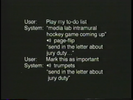
Communication is about people, not machines. But as firms and families alike spread out geographically, we rely increasingly on telecommunications tools to keep us “connected”. The challenge of such systems is to enable conversation between individuals without computational infrastructure getting in the way. This paper compares two speech-based communication systems, Phoneshell and Chatter, in how they deal with the keys to communication: proper names. Chatter, a conversational system using speech-recognition, improves upon the hierarchical nature of the touch-tone based Phoneshell by maintaining context and enabling use of anaphora. Proper names can present particular problems for speech recognizers, so an interface algorithm for reliable name specification by spelling is offered. Since individual letter recognition is non-robust, Chatter implicitly disambiguates strings of letters based on context. We hypothesize that the right interface can make faulty speech recognition as usable as TouchTones---even more so.

Distributed client/server models are becoming increasingly prevalent in multimedia systems and advanced user interface design. A multimedia application, for example, may play and record audio, use speech recognition input, and use a window system for graphical I/O. The software architecture of such a system can be simplified if the application communicates to multiple servers (e.g., audio servers, recognition servers) that each manage different types of input and output. This paper describes tools for rapidly prototyping distributed asynchronous servers and applications, with an emphasis on supporting highly interactive user interfaces, temporal media, and multi-modal I/O.
The Socket Manager handles low-level connection management and device I/O by supporting a callback mechanism for connection initiation, shutdown, and for reading incoming data. The Byte Stream Manager consists of an RPC compiler and run-time library that supports synchronous and asynchronous calls, with both a programmatic interface and a telnet interface that allows the server to act as a command interpreter. This paper details the tools developed for building asynchronous servers, several audio and speech servers built using these tools, and applications that exploit the features provided by the servers.

A long standing challenge in pen-based computer interaction is the ability to make sense of informal sketches. A main difficulty lies in reliably extracting and recognizing the intended set of visual objects from a continuous stream of pen strokes. Existing pen-based systems either avoid these issues altogether, thus resulting in the equivalent of a drawing program, or rely on algorithms that place unnatural constraints on the way the user draws. As one step toward alleviating these difficulties, we present an integrated sketch parsing and recognition approach designed to enable natural, fluid, sketch-based computer interaction. The techniques presented in this paper are oriented toward the domain of network diagrams. In the first step of our approach, the stream of pen strokes is examined to identify the arrows in the sketch. The identified arrows then anchor a spatial analysis which groups the uninterpreted strokes into distinct clusters, each representing a single object. Finally, a trainable shape recognizer, which is informed by the spatial analysis, is used to find the best interpretations of the clusters. Based on these concepts, we have built SimuSketch, a sketch-based interface for Matlab's Simulink software package. An evaluation of SimuSketch has indicated that even novice users can effectively utilize our system to solve real engineering problems without having to know much about the underlying recognition techniques.